Bahaka: A Unique Display Font for Distinctive Design Projects
Typography plays a crucial role in the visual identity of any project, from branding and marketing to web design and editorial layouts. Choosing the right font can elevate your message, evoke emotion, and create a lasting impression. One standout option in this space is Bahaka, a cool and unique textured display font known for its distressed letterforms. This article explores how Bahaka fits into different design processes, when it's best used, and practical tips for integrating it into your workflow.
Understanding Bahaka’s Purpose and Style
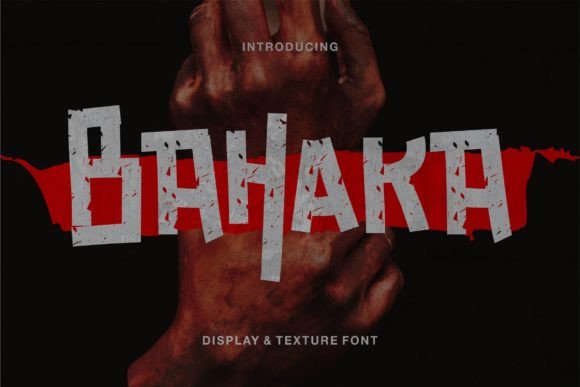
Bahaka is not just another decorative typeface; it’s a tool designed to bring character and texture to projects that require a bold, unconventional look. The font features rough edges, uneven strokes, and a grunge-inspired aesthetic that immediately grabs attention. These qualities make it ideal for use in situations where you want to convey a sense of rawness, authenticity, or rebellion.
While Bahaka excels as a display font—meaning it’s best suited for headlines, titles, and short text segments—it should be used with care due to its high contrast and irregular shapes. It's not recommended for body text or long paragraphs, where readability is paramount. Instead, it shines in contexts like posters, banners, logos, social media graphics, and packaging where impact and style take precedence over legibility.
Before a Project Starts: Setting the Tone
Font selection often begins during the planning phase of a creative project. When choosing Bahaka at this stage, consider the overall mood and target audience. If your brand or campaign aims to reflect a gritty, underground, or alternative vibe, Bahaka could be the perfect match. It helps establish a consistent visual language early on, guiding other design decisions like color schemes, imagery, and layout styles.
Before finalizing Bahaka as part of your typographic strategy, review it against your brand guidelines. Ensure it aligns with your core values and messaging. You might also pair it with a more neutral sans-serif or serif font for balance, especially if you plan to use it alongside body text.
During the Creative Process: Enhancing Visual Impact
Once you've started working on your project, Bahaka can serve as a powerful stylistic element. For example, in logo design, using Bahaka can help you quickly prototype a bold headline that stands out. Its textured nature allows for subtle variations in weight and shape, which can add depth and dimension when layered with effects like shadows or gradients.
In graphic design tools such as Adobe Photoshop or Illustrator, Bahaka works well with vector-based editing. You can manipulate individual letters, apply textures, or even break apart characters to create custom compositions. Since the font has an inherently distressed look, you may find yourself needing less additional post-processing than with cleaner fonts.
After Completion: Final Touches and Presentation
Even after a design is finalized, Bahaka can play a role in enhancing the presentation. For instance, when exporting materials for print or digital use, ensure that the font is embedded correctly or converted to outlines to avoid compatibility issues. This step is especially important when sharing files with clients or collaborators who might not have the font installed locally.
If you're presenting a design portfolio or case study, Bahaka can be used sparingly in headings or captions to draw attention to key elements. However, always test its appearance across different platforms and devices to maintain consistency and clarity.
Integrating Bahaka with Other Tools and Resources
Bahaka is compatible with most major design software, including Canva, Figma, Sketch, InDesign, and CorelDRAW. To integrate it smoothly, start by installing the font on your system or uploading it directly into the platform you’re using. Some tools allow you to upload custom fonts via their web interface, making the process straightforward.
When working with web developers or content creators, provide clear instructions regarding font usage. Specify whether it should be applied only to certain elements (like headings) and note any accessibility considerations. While Bahaka is visually striking, it’s essential to ensure that your designs remain functional and inclusive.
You can also enhance Bahaka’s appeal by pairing it with complementary assets such as:
- Background textures that echo the grunge theme.
- Color palettes featuring muted tones like greys, browns, and blacks.
- Photography or illustrations with a similar rugged or urban aesthetic.
Practical Tips for Using Bahaka Effectively
To maximize the effectiveness of Bahaka in your work, keep the following tips in mind:
- Use it selectively: Because of its strong personality, Bahaka should appear in limited quantities within a design. Overuse can overwhelm viewers and dilute the message.
- Adjust spacing manually: Textured fonts like Bahaka sometimes have inconsistent kerning. Take time to fine-tune the spacing between characters for a polished result.
- Layer with effects: Add subtle effects like noise overlays, drop shadows, or stroke outlines to amplify its grunge feel without making it unreadable.
- Test on multiple screens: The way Bahaka renders can vary depending on screen resolution and operating system. Always preview it on different devices before finalizing a design.
- Consider licensing: Before using Bahaka in commercial projects, confirm that the license covers all intended uses. Many display fonts are restricted to personal or non-commercial applications unless specifically purchased for broader rights.
Real-World Use Cases for Bahaka
Bahaka finds its place in various real-world scenarios. Here are a few examples:
Marketing Materials
For event posters, album covers, or promotional banners targeting niche audiences (e.g., music festivals, indie brands, or subcultures), Bahaka adds an edgy flair. It’s particularly effective when paired with high-contrast visuals and minimal text.
Branding for Startups and Small Businesses
Entrepreneurs and small business owners looking to stand out from the crowd can leverage Bahaka in logo concepts or taglines. It’s especially useful for businesses in the fashion, art, or lifestyle sectors aiming for a rebellious or artistic image.
Web Design and UI Elements
On websites, Bahaka can be used for hero sections, call-to-action buttons, or section headers. Make sure to include fallback fonts in your CSS code to handle cases where Bahaka isn’t available. Here’s an example of how to implement it in HTML/CSS:
Social Media and Content Creation
Bloggers, influencers, and marketers can use Bahaka in Instagram stories, YouTube thumbnails, or TikTok titles to capture attention. It works especially well in video overlays or animated text effects that highlight its dynamic structure.
Factors to Consider for Long-Term Use
While Bahaka is a versatile asset, there are several factors to consider when incorporating it into your ongoing design work:
Preparation and Compatibility
Always back up your font files and store them in a centralized location. If you're collaborating with others, share the font file securely or convert text layers to outlines in design software. Additionally, verify cross-platform compatibility—especially when designing for both web and print.
Usability and Readability
Although Bahaka is great for visual impact, prioritize readability in critical areas. Pair it with simpler, more legible fonts for body copy and labels. Keep line lengths short and avoid using it in small sizes or low-contrast environments.
Organization and Efficiency
Keep track of where and how you use Bahaka in your projects. Maintain a style guide or typography cheat sheet to ensure consistency across all materials. This practice saves time and reduces the risk of misaligned aesthetics in future updates or redesigns.
Quality Control and Consistency
Review all outputs involving Bahaka for quality. Check for pixelation, missing glyphs, or rendering inconsistencies. Establishing a routine QA process will help maintain professionalism and prevent last-minute revisions.
How Bahaka Complements Other Fonts and Styles
Bahaka doesn't need to stand alone. In fact, combining it with other fonts can lead to more balanced and compelling designs. For example:
- Pair with a clean sans-serif like Helvetica or Arial for a modern yet edgy contrast.
- Contrast with a soft serif such as Georgia or Merriweather to highlight the ruggedness of Bahaka.
- Match with minimalist layouts to let the font take center stage without competing for attention.
These combinations allow you to maintain visual hierarchy while adding personality to your work. Just remember to limit the number of fonts used in any single project to preserve cohesion and professionalism.
Conclusion
Bahaka is a valuable addition to any designer’s toolkit, offering a distinctive, textured appearance that supports a wide range of creative workflows. Whether you're crafting a brand identity, designing promotional materials, or creating engaging content online, this font provides the edge needed to stand out. By understanding its strengths and limitations, you can use Bahaka effectively to enhance your projects without compromising usability or clarity.
With thoughtful implementation and strategic pairing, Bahaka becomes more than just a font—it becomes a design statement. As you continue to explore new ways to express your ideas visually, remember that the right typography can make all the difference in how your message is received and remembered.